BEE THE ONE Labs · App studio
Moneycomb app icon

Expense trackerFor Android 8.0 and later

Moneycomb.

Moneycomb (formerly Bee Budget)

Know where your money goes, and what's safe to spend today. A friendly expense tracker that keeps everything on your phone. No account, no bank login and no ads.
Every feature freeNo adsNo bank loginStays on your phone
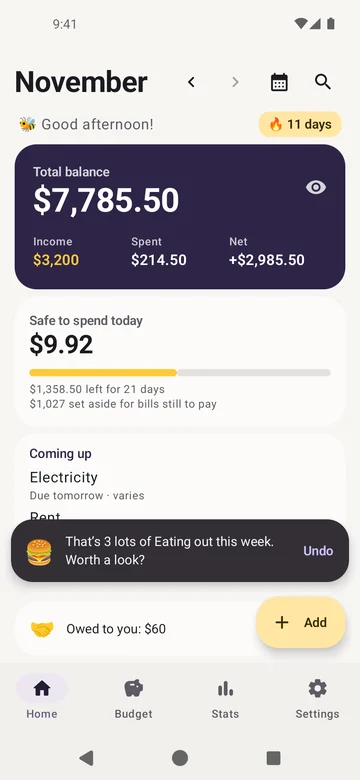
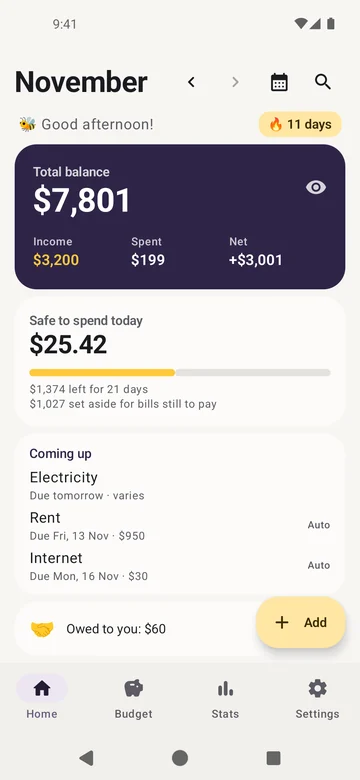
Moneycomb's home screen: total balance, safe to spend today and bills coming up
100%Features free

Every feature is free for everyone. Pro only changes how the app looks.

1Number to check

Safe to spend today, after the bills still to pay are set aside.

0Bank logins

No bank or card details. You log what you spend, in seconds.

0Ads

No ads, no account and no analytics. Your money data never leaves your phone.

Money, made calm

Most money apps show ads or lock the useful parts behind a subscription. In Moneycomb every feature is free, your data stays on your phone and the bee cheers you on. It never scolds.

A look inside
Every penny,
in its cell.

Home: total balance, safe to spend today and bills coming up
Know what's safe to spend, after the bills are set aside.
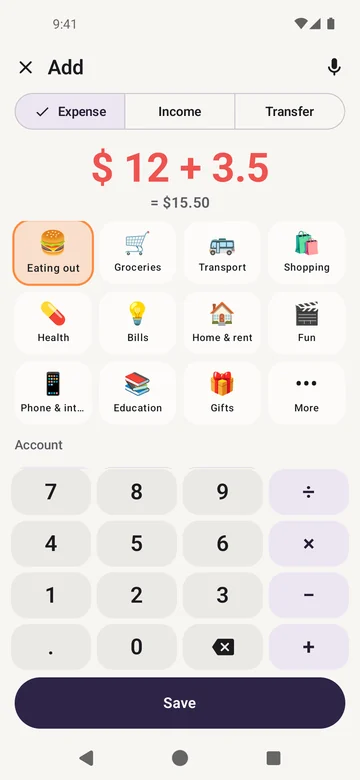
Adding an expense with the calculator keypad
Log it in seconds, with a calculator keypad.
Say it: telling the bee about a purchase
Say it: "450 on lunch yesterday", and the bee fills it in.
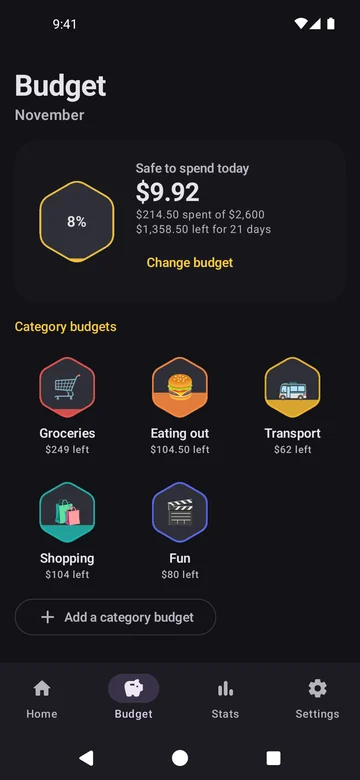
Category budgets as honeycomb cells filling with honey
Category budgets fill with honey as you spend.
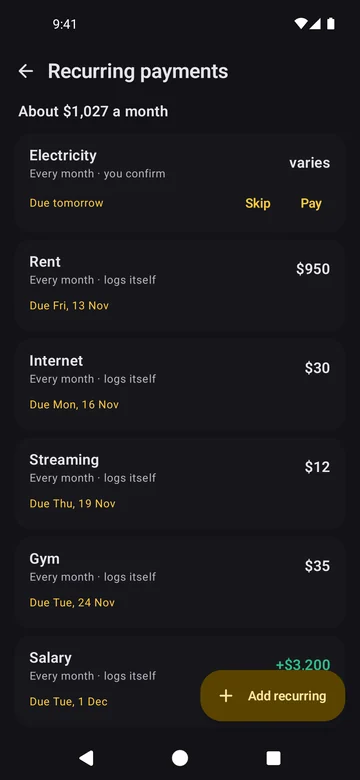
Recurring payments: salary, rent and bills
Salary, rent and bills, sorted.
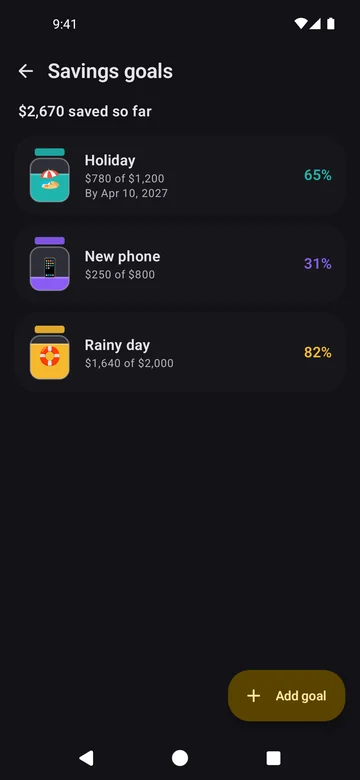
Savings goals shown as honey jars
Save up in honey jars.
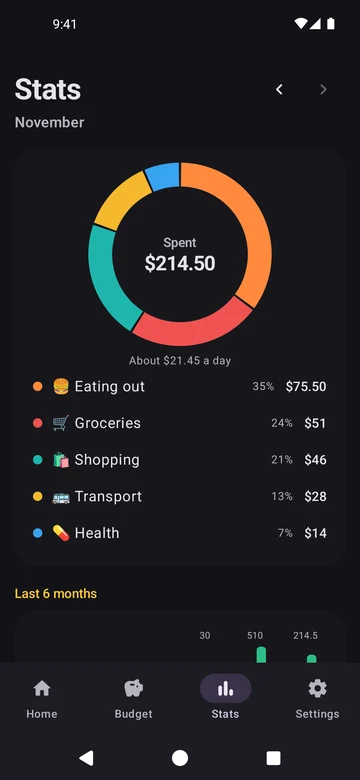
Charts by category and month
See where it all went, by category and month.
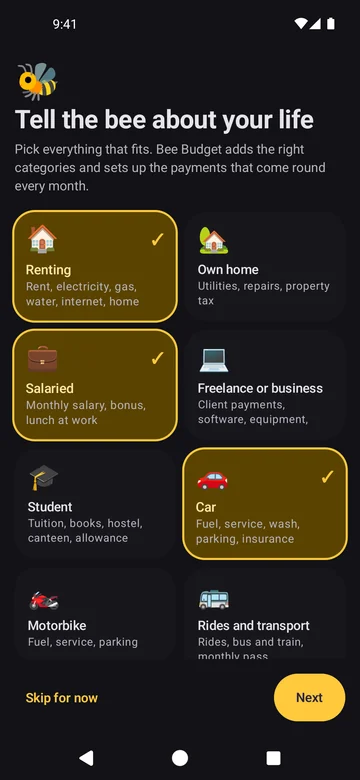
Tell the bee about your life to set up categories
Made for your life: set up in a minute.

New in Moneycomb 0.10

Save more,
wait smarter.

Savings challenges, a wish list with a cooling-off wait, money you're owed, new widgets and encrypted sync between your phone and tablet. Every one of them free.

Savings challenges

  • No-spend days
  • Spend less on one thing
  • 52-week saving

A wish list that waits

  • Park something you want for a cooling-off wait
  • Then buy it or keep the money
  • So you only buy what you still want

Claim it back

  • Mark what work or a friend will pay you back
  • Log it when the money comes in

Log it faster

  • Share a bank SMS or payment message from any app to Moneycomb to log it
  • Widgets for safe to spend and bills this week
  • Quick add with your top categories

Phone and tablet in step

  • Sync your devices through your own Google Drive
  • Encrypted on your phone with a passphrase only you know
  • No Moneycomb account or server; off until you turn it on

14 languages, made for everyone

  • Adds French, German, Russian, Bengali, Vietnamese and Filipino
  • A tablet layout
  • Better screen-reader support and large-text fixes

Features

Know where
it goes.

Any currency, with amounts that fit even in the millions. In English, Urdu, Hindi, Indonesian, Spanish, Portuguese, Turkish and Arabic. Light, dark and true-black themes.

Safe to spend today

  • Set a monthly budget and see exactly what you can spend today
  • Bills still to pay are set aside first, so there are no surprises
  • Category budgets are honeycomb cells that fill as you spend

Log it in seconds

  • A calculator keypad: type 12 + 3.5 and it adds it up
  • "Say it": tell the bee "450 on lunch yesterday"
  • "Again?" buttons, home-screen widgets and a Quick Settings tile

Salary, rent and bills

  • Anything that comes round: salary, rent, internet, school fees, subscriptions
  • Same amount every time? It logs itself
  • Changes each month? The bee reminds you to enter it

Honey jar goals

  • Savings goals with a target date
  • How much to put in each month
  • Holiday, new phone, rainy day: watch each jar fill

A bee that cheers

  • Logging streaks and no-spend days
  • Payday cheers and a monthly recap of where it all went
  • Gentle nudges; it never scolds

Will you make it to payday?

  • Home shows where your money is heading at your usual pace
  • Bills still to come are counted in
  • The bee spots payments you log by hand every week or month and offers to make them bills

Insights and your year

  • Spending against your own usual
  • An optional heads-up when a category runs well over
  • Your year in review, with a picture to share (amounts left off unless you want them)

Plan it, pay it off

  • Plan all your income on the Budget tab: give every bit a job
  • A debt payoff plan with interest and minimums
  • Smallest-first or highest-interest-first, and your debt-free date

Budgets your way

  • Budget months that start on payday
  • Weekly, monthly or yearly category budgets; unspent money rolls over
  • Split one purchase across categories, add receipt photos, or leave an entry out of the numbers

Cards and currencies

  • Card limits and payment-due reminders
  • Things bought on installments stop by themselves after the last payment
  • Any currency per entry, with today's exchange rate a tap away

Your data, your way

  • Back up to one file (Google Drive or anywhere) and restore on a new phone, or let it back up by itself daily or weekly to a folder you pick
  • Export to CSV, Excel or a PDF report
  • Import a CSV from a spreadsheet, a bank statement or another money app

Everything else

  • Cash, bank, card and savings accounts, with transfers
  • Money you lend or borrow, with repayments
  • Family budgets and trip splitting, shared live with a code
  • Calendar, search, charts, #tags with totals and your net worth over time

Free & Pro

Every feature,
free.

Nothing useful is locked. Pro is optional and only changes how the app looks.

Free

Forever

The whole app, for everyone. No ads, no trial.

  • Budgets and safe to spend today
  • Payday forecast, insights and a debt payoff plan
  • Recurring payments and reminders
  • Savings goals and accounts
  • Charts, calendar and search
  • Backup, export and import
  • Widgets, Quick Settings tile and "Say it"
  • Savings challenges, wish list and claim it back
  • Encrypted sync between your devices
  • App lock and hidden balances

No ads, no account, no bank login.

Pro

Looks only

For people who want to make it theirs, and support the studio.

  • Ten app colours, from Ocean and Forest to Lavender and Mocha
  • Widget styles: Glass, Midnight, Paper, Honey and Ink

Monthly, yearly or a one-time lifetime purchase. Prices show in the app.

Now in testing

Help us
test it.

Moneycomb is in a closed test on Google Play. Join in two steps, try adding expenses, a budget, a bill and a savings goal, and tell us what's confusing or missing.

  1. Join the testers groupAnyone can join, with the Google account you use on your phone.Join the group ↗
  2. Opt in on Google PlayThen install Moneycomb from its Play page.Become a tester ↗ Play page ↗
  3. Tell us what you thinkIdeas, bugs or a kind word.support@beetheonelabs.com ↗

Private by design

Your money,
your business.

Your money data stays on your phone, except a family or trip group you choose to share, or encrypted sync to your own Google Drive if you turn it on. No account, no bank or card details, no analytics, no ads.

Read the privacy policy ↗
  • Stays on your phone

    Expenses, budgets, bills and goals are stored on your device. Only groups you choose to share go online. Sync is encrypted with your passphrase and kept in your own Google Drive. Backups and exports go only where you save them.

  • Lock and hide

    Lock the app with your fingerprint or phone PIN, and hide balances in public.

  • No bank login

    Moneycomb never asks for bank or card details. You stay in control of what goes in.

FAQ

Moneycomb,
answered.

Is Moneycomb free?
Yes. Every feature is free for everyone, with no ads and no trial. Optional Pro only changes how the app looks: app colours and widget styles. You can also buy the bee a jar of honey to say thanks; tips unlock nothing.
Does it connect to my bank?
No. Moneycomb never asks for bank or card details. You log what you spend with a calculator keypad, a widget, a Quick Settings tile or by saying it, and salary, rent and fixed bills can log themselves.
Where is my data stored?
On your phone. There is no account and no analytics, and your money data stays on your device. The one exception is a family or trip group you choose to share with a code: that group is stored in Google Firebase so its members see the same entries, and you can stop sharing at any time. If you turn on device sync, an encrypted copy that only your passphrase can open is kept in your own Google Drive. Read the privacy policy.
Can I use it on my phone and tablet?
Yes. Turn on Settings > Sync your devices on each one. Your entries are encrypted on your phone with a passphrase only you know and kept in Moneycomb's hidden folder in your own Google Drive, so neither Google nor we can read them. There is no Moneycomb account or server, and receipt photos stay on each device. Moneycomb also has a tablet layout.
What does "safe to spend today" mean?
Set a monthly budget and Moneycomb shows exactly what you can spend today. Bills still to pay this month are set aside first, so there are no surprises.
Which currencies does it support?
Any currency, with amounts that fit even in the millions, and today's exchange rate is a tap away. The app is in 14 languages: English, Urdu, Hindi, Bengali, Indonesian, Vietnamese, Filipino, Spanish, Portuguese, French, German, Russian, Turkish and Arabic.
How do I join the test?
Two steps: join the testers group with the Google account on your phone, then opt in on Google Play and install Moneycomb. Feedback goes to support@beetheonelabs.com.